Overview
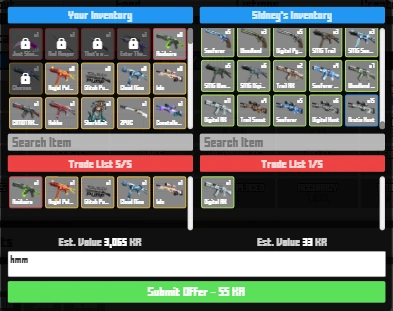

This is how the trading interface currently looks like
Introduced in update 2.3.9, trading was a highly-anticipated feature. Allowing for players to exchange in game items, such as skins, hats, backs, sprays, dyes, waists, faces, with the rest of them being the market.
In order to access trading features, the player must have an account of or over level 10. This is to prevent most forms of abuse on this trading system.
When this was initially released, you had to be verified in order to trade, but now this barrier is removed.
Functions


The "Trade" button is now on the right side of a user's profile in Krunker Hub.
- Visiting a Player's Profile - To submit an offer to another player, you must visit their profile page. (example: https://krunker.io/social.html?p=profile&q=username) Simply replace "username" with the username of the desired player you wish to visit.
- Sending a Trade Offer - A player can select 5 or less of their own items, and 5 or less of the other player's items, and then submit an offer. Players with the Krunker Premium Subscription have this cap raised to 15 or less items.
- A Lock icon appears on non-tradable items in trade mode
- A 'Hide Non-Tradable Skins' setting was also added
- Accepting a Trade Offer - In the "Trades" tab on the market, you can view offers that you sent out to other players, and offers that were sent to you. To review an offer, simply click on it and view it, all items in the trade can be clicked on, and the item stats will open. If you choose to accept you can press "Accept", or you could decline.
- KR Tax - For every Uncommon, Rare, and Epic item added to an offer is an extra 5 KR, regardless of which side it comes from. For each Legendary or Relic item is an extra 10 KR, each Contraband is an extra 25 KR, and each Unobtainable is an extra 200 KR. However, trading live, rather than sending trades, will only cost you 10 KR per trade, no matter the amount, rarity, or any information about the items being traded, but it must be done in a trade map (only in custom and official custom lobbies).
- Trades where you receive nothing in return will be highlighted in red, and trade where you give nothing for items are highlighted in green.
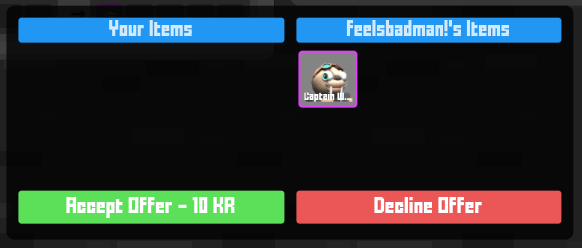

The trade offer interface in a live trading lobby.
Trade History is also a feature where you can check all the history of your trading in the Krunker Hub. Here's how it looks like.
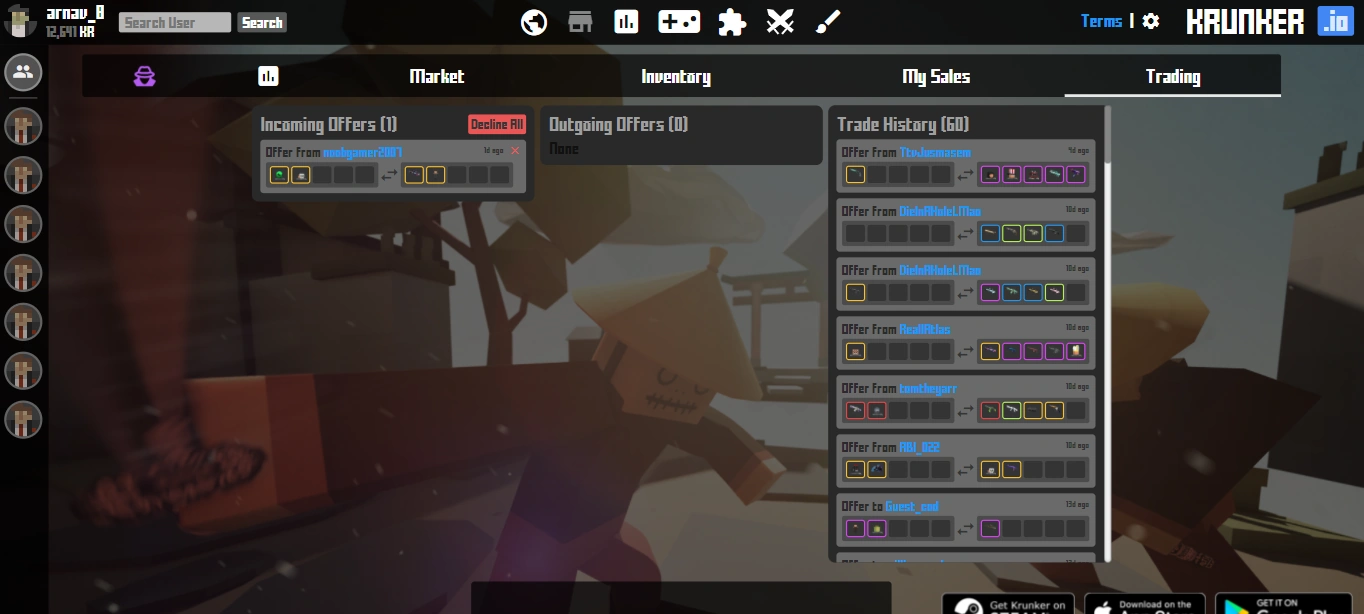

This is the Krunker Trading tab in the Krunker Hub and it also has the Trade History tab.
There are Incoming and Outgoing offers as well on the same Krunker Hub Trading page.
Trade Lobbies
Trading primarily takes place on the Krunker Hub, however, update v2.4.1 brought a new custom game mode, where trading can be done in real time with other players in the lobby.
| Miscellaneous | |
|---|---|
| Special | Change Log • Rules • Social Media • Staff • Tutorials |
| Economy | Trading • Marketplace • Black Market • Premium • Skins • Shop • Krunkies • Seasons • Billboards • Backs • Dyes • Faces • Hats • Sprays • Waists • Wrists • Charms • Tickets |
| Game Stuff | Game Modes • Custom Games • Game Settings • Moveset • Scoring • Battlepass • Krunker Client • Seasons • Settings • Experience |
| Krunker Hub | Accounts • Clans • Tournaments |
| Maps | Map list • Map Editor Guide |
| Other | Krunker Client • Krunker Mobile • Events • Texture Viewer • Modmaking • Account Recovery |