Spectating is a feature added in update v1.0. Spectating was implemented as a way to view a game without actively participating in it.
With update v2.1.4, first person perspective was made default within settings. You can change it to free camera by pressing the "F" key. Spectating has now become more realistic, you can see the player's ADS or points received through kills.
In all modes, you will see the timer, game mode, teams (if spectating a team match), and players on the top of your screen, with the controls on the bottom. The number of kills and deaths can be viewed in first person and third person modes.
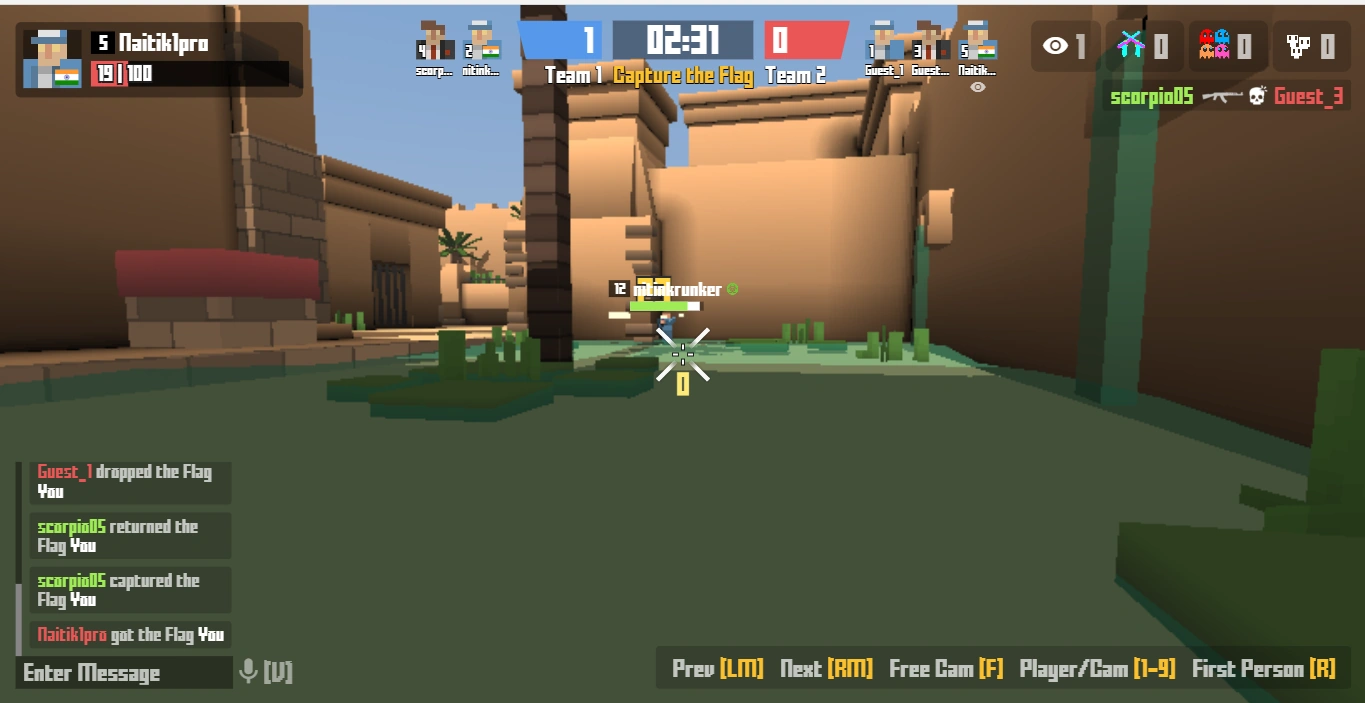

Spectating in First Person Mode
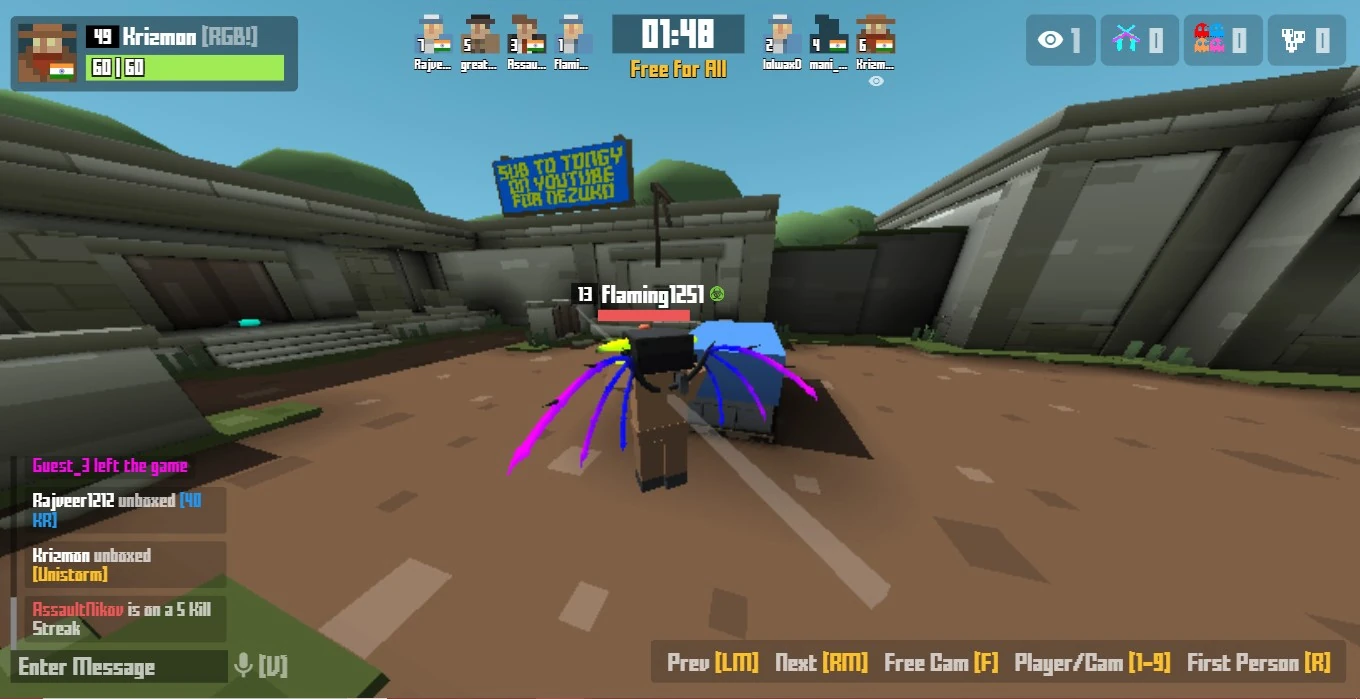

Spectating in Third Person Mode
In the first person and third person mode, the camera is fixed on a player of your choice, and you can spectate the various player's action like slidehopping, toggling ADS, etc. All players are assigned a number (from 1 to 9 generally but it can be different in case of custom games) along with their class, toggling modes using the button "R". The next player or the previous player can be spectated by clicking the Right or Left mouse buttons respectively. The mode can also be toggled to free cam mode by pressing "F".
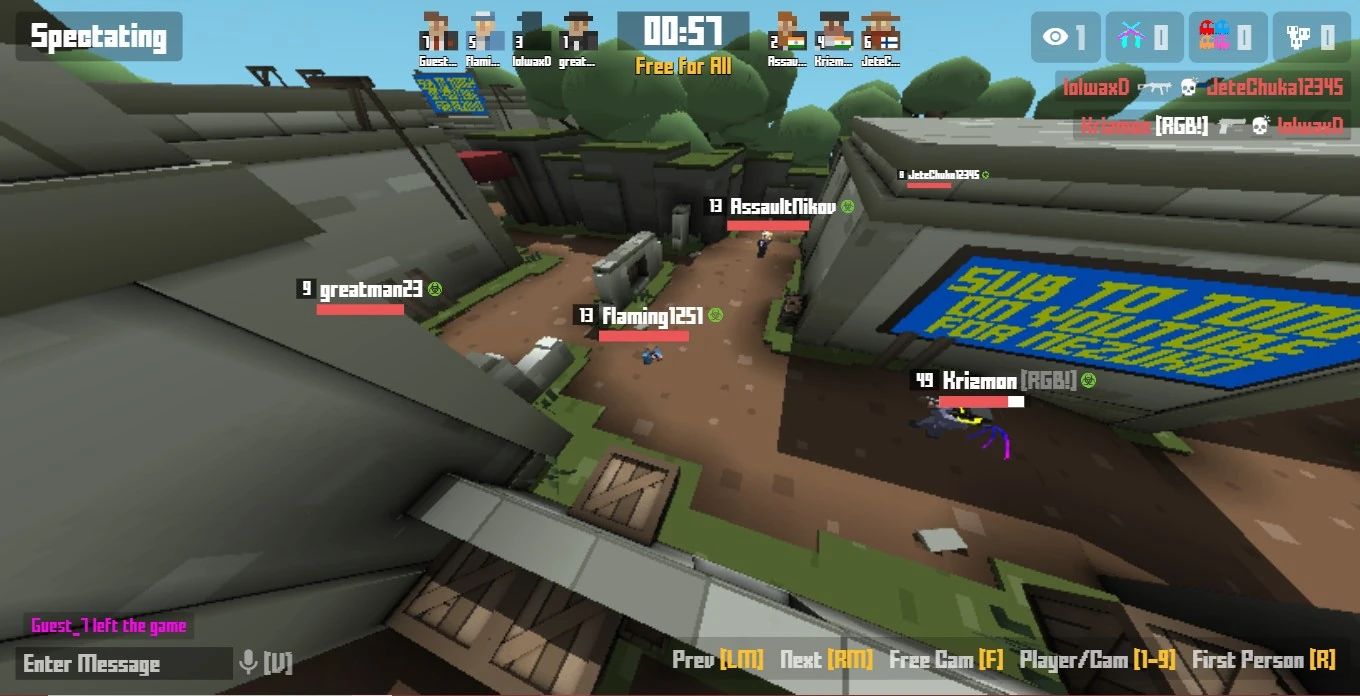

Spectating in Free Cam Mode
In the Free Cam Mode, your camera hovers just like how it does in the map editor mode: You can look around and use WASD to fly in a certain direction; you will also fly the way you are looking at if you hold W. Using the Q and E keys will move your camera up and down. Strafing allows you to fly faster. Your camera can also go through through walls and objects, resulting in unique views like the one shown in the screenshot to the right.
Spectating is a useful tool to find and report hackers and glitch abusers. It is also frequently used by curious users to quickly survey large maps to look for all sorts of hidden looks and crannies implemented by the mapmaker.
NOTE:
- Players can cheat in the Hide and seek or Infected modes by using the tool as a "radar" to find hiding enemy players. If you are a game host you are strongly advised to turn off the spectate setting beforehand.
- Some game types will force you to spectate if you joined late. These game types are LMS and OITC. You can also enable this by default when hosting a game by adjusting the "Lives" settings.
History
- v1.0.0 - Added to the game.
- v1.0.1 - Spectating became a setting you could turn off in the custom games.
- v1.0.2 - Spectating icon added to the in-game leaderboard, spectating players can now see other players' names and healthbars.
- v1.0.3 - Spectators do not show up on the leaderboard; instead, there's instead a number that shows how many players are spectating.
- v1.3.1 - Spectators can see how much time is remaining in the match and the scores of teams in team modes.
- v1.3.4 - Spectators can move the spectating camera up and down with Q & E keys
- v1.4.7 - Scroll to Increase/Decrease camera speed when spectating
- v1.5.5 - Added Third Person Spectating
- v1.7.4 - Updated Spectate Display
- v1.8.1 - Fixed Player name colors on end board when spectating
- v1.9.3 - Added Spectate Camera Objects to the Editor
- v1.9.7 - Fixed Zooming issue when spectating a player
- v2.0.2 - Added Setting to hide Spectate Count
- v2.0.9 - Added Kick Spectators Button to the Player List (Host only). Spectating now works in Test mode also.
- v2.1.1 - Fixed Spectate Cam rotation issue
- v2.1.2 - Added basic first person spectating (WIP: Better sync etc)
- v2.1.3 - Hide Spectate Crosshair when opening TAB Window. Hitmarkers & DMG now show while spectating. Updated class icon while spectating
- v2.1.4 - First Person Spectating is now Default. Added Aim/Zoom to First Person Spectating. Fixed Spectating Display Icon Location and Disappearing. Optimized Spectating Screen
- v2.1.5 - Added Level display to Spectate Display. Scope now shows on First Person Spectating
- v2.1.6 - Fix name flash when spectating. Fixed Scope rendering on spectate. Fixed clan display on Spectate Card
- v2.1.7 - Added country flags to spectate player screen
- v2.1.8 - Fixed glitch where scope shows in third person spectating. Crosshair now hides when scoped in as a spectator. Aligned country flags on spectate screen
- v2.1.9 - Fixed spectate interpolation to not be as snappy on high fps. Fixed name not showing after spectating. Particles now render while Spectating
- v2.2.3 - Fixed Spectating UI not updating. Spectating Numkeys are now fixed per player
- v2.2.4 - Realigned Spectate Player Numbers
- v2.2.9 - Removed Spectate Count Display
- v2.5.9 - Removed Spectate Count Display
- v2.6.0 - Progress Bar now shows when spectating in defuse mode
- v2.9.4 - Can now call the KPD from Spectate Mode
- v3.1.1 - Disabled Free Cam Spectating in Raid Mode
- v3.1.5 - Moved Spectate Button
- v3.1.7 - Fixed Spectating not working in Test Mode
- v3.4.8 - Fixed issue with Hitmarker not working in spectate mode on Raid
- v3.4.9 - Fixed issue with Speedrun UI overlapping with Spectate UI
- v3.5.3 Fixed spectating issue on Official 24/7 FFA Servers
- v3.5.4 - Fixed Spectate issue where players disappear on certain modes
- v3.8.0 - Can now see caller on spectate UI for KPD
- v4.0.6 - Fixed Spectating issue
- v4.1.1 - Added Focus Player setting (Spectating - useful for KPD)
- v4.1.4 - Added Focus to Spectator UI
- v4.1.8 - Fixed Switching Players while Spectating
- v6.0.8 - Added experimental minimap to spectating hud
- v6.0.9 - Added more options to spectating minimap
- v6.1.0 - Various minimap changes
| Miscellaneous | |
|---|---|
| Special | Change Log • Rules • Social Media • Staff • Tutorials |
| Economy | Trading • Marketplace • Black Market • Premium • Skins • Shop • Krunkies • Seasons • Billboards • Backs • Dyes • Faces • Hats • Sprays • Waists • Wrists • Charms • Tickets |
| Game Stuff | Game Modes • Custom Games • Game Settings • Moveset • Scoring • Battlepass • Krunker Client • Seasons • Settings • Experience |
| Krunker Hub | Accounts • Clans • Tournaments |
| Maps | Map list • Map Editor Guide |
| Other | Krunker Client • Krunker Mobile • Events • Texture Viewer • Modmaking • Account Recovery |